Understanding Key Concepts in Azure Networking

Microsoft Azure offers Azure Virtual Network (VNet) as its core networking service, enabling users to create private, secure, and scalable cloud networks. Whether you're setting up cloud-only applications or hybrid architectures, understanding VNets is crucial.
In addition to virtual networks and connectivity options, Azure provides tools to monitor and manage network traffic, perform load balancing, and ensure secure user connections.
What is an Azure Virtual Network (VNet)?
An Azure Virtual Network (VNet) is a private, secure network in the cloud that links your Azure resources, such as virtual machines, databases, and apps. It allows you to manage how these resources communicate with each other and the internet, ensuring privacy and security. Essentially, it's like having your own isolated network in the cloud.
Think of it as your own private, isolated “office” in the Azure cloud. The resources in this VNet can talk to each other, but they’re shielded from the outside world unless you explicitly allow it.
Key Benefits of Azure VNets
Isolation: Just like a physical network in your office, you can control which resources can communicate with each other. This is done using subnets, which divide your VNet into smaller, more manageable sections.
Security: Using Network Security Groups (NSGs), you can restrict traffic between resources, like a security guard at the entrance of your office only letting authorized people in.
Flexibility: VNets can easily grow or shrink as your cloud needs change. Add more resources, or scale down based on demand — just like rearranging your office layout to accommodate a growing team.
Connectivity: You can even connect your VNet to other VNets or extend it to your on-premises office network using VPN Gateways or ExpressRoute for hybrid cloud solutions.
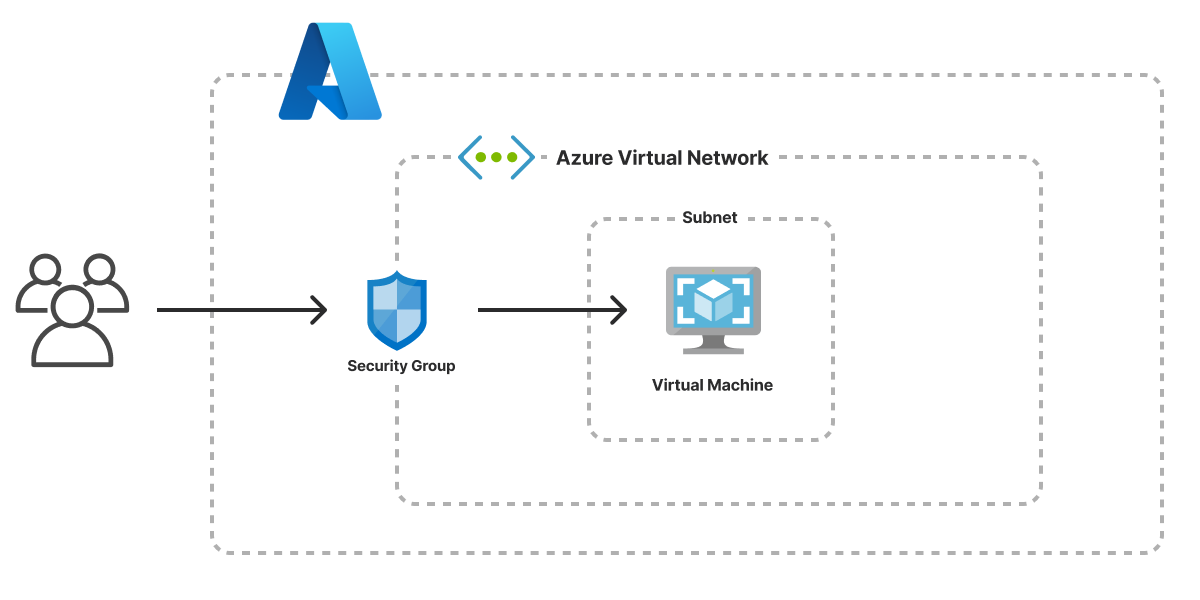
Core Concepts of Azure Networking
1. Subnets
Let’s understand this with a example, Let’s think of subnets as different floors or rooms in your office. Each room has a specific function, and you control who can enter each room. For example:
One room (subnet) could house your web servers.
Another room could be reserved for your database servers.
A third room might host your application servers.
VNets can be divided into subnets, which help segregate resources logically and apply specific security policies. Common subnet use cases include:
Web Tier Subnet: Hosts frontend applications.
App Tier Subnet: Runs backend services and APIs.
Database Subnet: Stores and processes data with restricted access.
2. Application Gateway
Now, imagine that your office has a receptionist who directs visitors to the right department. Azure Application Gateway works in a similar way—it is a traffic manager for your web applications. It ensures that web requests are routed efficiently to the right backend services.
It operates at the application layer (Layer 7), and it’s responsible for:
Load balancing web traffic to different servers.
SSL termination, meaning it handles encrypted connections to improve performance.
URL-based routing, sending traffic to specific backend pools based on the URL. For example:
Traffic going to
www.yourcompany.com/frontend/*can be routed to the frontend servers.Traffic going to
www.yourcompany.com/api/*can be routed to the backend servers.
It can also provide security through a Web Application Firewall (WAF), protecting your application from threats like SQL injection and cross-site scripting (XSS).
2. IP Addressing
When you assign an IP address to a resource in your VNet, it's like giving each phone in your office a unique extension number. With both private IPs (for communication within the VNet) and public IPs (for communication with the outside world), you can control how each resource interacts externally.
Each VNet needs an address space (CIDR block) that sets its IP range. These addresses can be assigned as:
Private IPs (for internal communication)
Public IPs (for internet-facing services)
3. Network Security Groups (NSGs)
Think of NSGs as the security team for your office network. They define who can access what. Want to restrict access to certain resources? An NSG can enforce these security rules to only allow certain types of traffic, ensuring unauthorized users don’t enter restricted areas.
NSGs act as firewalls for filtering inbound and outbound traffic based on rules. Example rules:
Allow HTTP (80) traffic to web servers
Restrict access to database subnet from the public internet
4. Azure Firewall
It works like the firewall at your office's main entrance, filtering incoming and outgoing traffic to protect against potential threats. It add’s a additional layer of protection to the network and resources.
5. Routing & User Defined Routes (UDRs)
Just like your office has clearly defined paths for communication between departments, User Defined Routes (UDRs) ensure that data flows efficiently between resources within and outside your VNet. You can customize these routes to ensure the right connections are made.
By default, Azure automatically routes traffic between subnets and connected networks. However, you can define User Defined Routes (UDRs) to customize how traffic flows.
6. Load Balancer
If you're running a high-traffic website or application, the Azure Load Balancer helps distribute traffic evenly across your VNet's resources. This Azure networking service automatically adjusts itself when administrators scale an instance..
7. ExpressRoute
Azure ExpressRoute is a networking service that creates a private connection between a company’s on-premises infrastructure and Microsoft Azure. Unlike the public internet, this private link offers lower latency and greater reliability.
ExpressRoute supports four connectivity models:
CloudExchange Colocation
Point-to-point Ethernet Connection
Any-to-any Connection
ExpressRoute Direct
8. Azure Network Watcher
Azure Network Watcher is a monitoring tool that provides insights into your Azure network resources. It helps IT teams track, diagnose, and analyze network performance by offering tools to view metrics, logs, and resource interconnections. Unlike individual resource monitoring, Network Watcher gives a comprehensive view of IaaS products, such as Azure VMs and VNets. Charges apply based on the features used.
9. Content Delivery Network
Azure CDN is a service that delivers high-bandwidth content, like documents and files, through cached copies stored at edge locations around the world. This ensures content is delivered closer to end users, minimizing latency. While Azure CDN optimizes content delivery, it focuses more on performance and less on load balancing and security compared to Azure Front Door. It's ideal for serving static content quickly and efficiently.
Comments
Join the discussionNo comments yet. Be the first to comment.